目錄表
Fail2ban
Fail2ban 是一套以 Python 語言所撰寫的 GPLv2 授權軟體,藉由分析系統紀錄檔,並透過設定過濾條件 (filter) 及動作 (action),當符合我們所設定的過濾條件時,將觸發相對動作來達到自動化反應的效果 (如封鎖來源 IP、寄信通知管理者、查詢來源 IP 資訊等)。因其架構相當彈性,我們可以針對自己的需求,設計不同的過濾條件與動作來達到伺服器防護的功能,或是及時的反應某些異常資訊。常見應用有:
- 阻擋 SSH、FTP 多次嘗試錯誤連線;
- 阻擋特定的瀏覽器或網路爬蟲;
- 提供管理者了解異常伺服器服務要求 (如 apache、bind、postfix、vsftpd、proftpd…)。
常見的像是 SSH 服務,當使用者嘗試輸入帳號密碼進行登入時,如發生驗證錯誤,系統將紀錄事件於記錄檔中。藉由即時的分析系統紀錄檔,我們可以過濾出一些有用的資訊,再加以判斷此類事件是否對伺服器服務有害。

Step 0:安裝
- Fedora 使用者
# yum install fail2ban
- CentOS 使用者
請先設定使用 ATrpms 的套件庫,再使用 yum 來安裝較新版本的 Fail2ban (目前大概是 0.8.4-23)。
# vim /etc/yum.repos.d/atrpms.repo
[atrpms]
name=Red Hat Enterprise Linux $releasever - $basearch - ATrpms
baseurl=http://dl.atrpms.net/el$releasever-$basearch/atrpms/stable
gpgkey=http://ATrpms.net/RPM-GPG-KEY.atrpms
gpgcheck=1
enabled=1
# yum install fail2ban
- Debian / Ubuntu 使用者
# apt-get install fail2ban
Step 1:設定檔說明
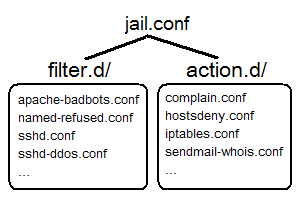
Fail2ban 的設定檔主要有以下三個項目:
jail.(conf|local)
用來設定 jail,即是定義 filter 與 action 的對應關係。filter.d/
用來定義過濾條件 (filter),目錄下已定義多種既有的過濾條件,常見的軟體有 apache、sshd、vsftpd、postfix 等,而常見記錄檔格式也可能為 Syslog、Common Log Format 等。action.d/
用來定義動作內容 (action),目錄下已定義多種既有的動作內容,如「sendmail 寄信通知」、「iptables 阻擋來源位址」、「使用 whois 查詢來源 domain 資訊」或「自動通知該來源 IP 的管理者」。

Step 2:設定範例
我們以 Fedora 用戶為例,首先編輯主要設定檔 jail.(conf|local),並設定一些基本資訊。
 為避免因為套件更新或升級,導致
 *.conf 檔案異動,建議將使用者自訂部分寫在 *.local 檔案中。
1. 全域設定
# vim /etc/fail2ban/jail.conf (.local)
[DEFAULT]
ignoreip = 127.0.0.1
bantime  = 600
findtime = 600
maxretry = 3
backend  = auto
ignoreip
指定哪些 IP、主機或是網段可以忽略,而不作任何動作。bantime
設定這個主機要被阻擋多久。maxretry
被封鎖前的最大嘗試失敗次數findtime
maxretry 產生後,多少時間內被封鎖。
2. 個別設定
[ssh-iptables]
enabled  = true
filter   = sshd
action   = iptables[name=SSH, port=ssh, protocol=tcp]
           sendmail-whois[name=SSH, dest=root, sender=fail2ban@myhost]
logpath  = /var/log/secure
maxretry = 5
上述例子,我們啟用 ssh-iptables 這個 jail,分析 /var/log/secure 記錄檔,並使用 sshd 這個 filter 來過濾,當符合條件且達最大重試次數 5 次時,便執行 iptables 與 sendmail-whois 兩個 action。
- sshd (filter) 設定檔為
/etc/fail2ban/filter.d/sshd.conf - iptables (action) 設定檔為
/etc/fail2ban/action.d/iptables.conf - sendmail-whois (action) 設定檔為
/etc/fail2ban/action.d/sendmail-whois.conf
Step 2:啟動或停止 Fail2ban
- Fedora / CentOS / RedHat 使用者
# service fail2ban start
# service fail2ban stop
- Debian / Ubuntu 使用者
# /etc/init.d/fail2ban start
# /etc/init.d/fail2ban stop
Step 3:觀察 Fail2ban 狀態
- 觀察目前啟動哪些 jail,下面例子可看到有
apache-notexist、apache-badbots、ssh-iptables三個 jail 啟用中。
# fail2ban-client status
Status
|- Number of jail:      3
`- Jail list:           apache-notexist, apache-badbots, ssh-iptables
- 觀察特定 jail 的內容,下面例子可觀察到
apache-notexist這個 jail,是分析/var/log/httpd/error_log記錄檔,累計有 7 次失敗,且已有 1 個 IP 被阻擋了。
# fail2ban-client status apache-notexist
Status for the jail: apache-notexist
|- filter
|  |- File list:        /var/log/httpd/error_log
|  |- Currently failed: 1
|  `- Total failed:     7
`- action
   |- Currently banned: 1
   |  `- IP list:       140.114.xxx.xxx
   `- Total banned:     1
進階設定說明
filter 的設定
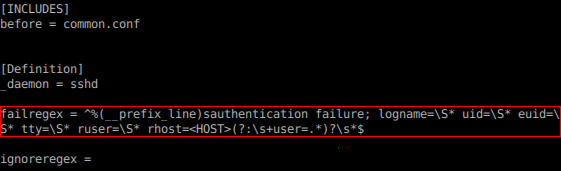
 欲定義過濾條件,可以編輯
 /etc/fail2ban/filter.d/*.(conf|local) 目錄下的檔案,如「sshd.conf」,後續於 jail.conf 中使用該 filter 則名為 sshd。每個 filter 設定檔中可分為以下幾個主要部分:
INCLUDES
可用來載入其他檔案的設定值,預設會自動引用.local檔案。before
於設定檔載入前先引用此檔案。after
於設定檔載入後再引用此檔案。
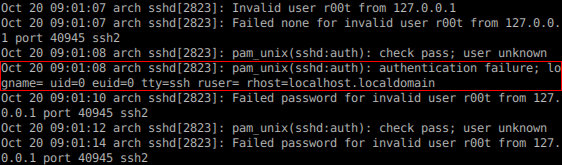
Definitionignoreregex
用來設定當符合此條件設定時,則忽略該行文字內容。


action 的設定
 定義動作內容,可以編輯
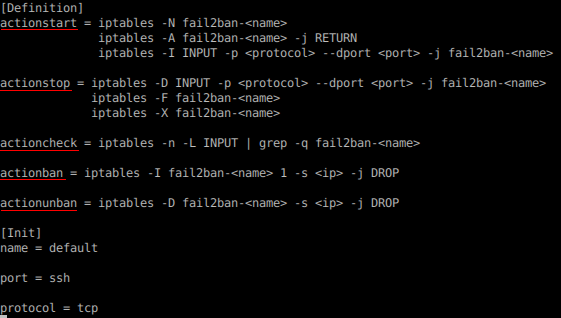
 /etc/fail2ban/action.d/*.(conf|local) 目錄下的檔案,如「iptables.conf」,後續於 jail.conf 中使用該 action 則名為 iptables。每個 action 設定檔中可分為以下幾個主要部分:
INCLUDES
可用來載入其他檔案的設定值,預設可自動引用.local檔案。Init
可用來預先定義變數,供 Definition 中使用。Definitionactionstart:定義當 Fail2ban 啟動時,所要執行的指令,如初使化設定。actionstop:定義當 Fail2ban 停止時,所要執行的指令。actionban:定義要阻擋某個 IP 時,所要執行的指令。actionunban:定義要取消阻擋某個 IP 時,所要執行的指令。actioncheck:定義於每次執行 actionban 或 actionunban 前,所要執行的指令,以判斷是否要執行 actionban 或 actionunban。

實際應用
- 阻擋嘗試登入的行為,如 SSH 遠端連線、FTP、Web 登入介面或是自行設計的帳號登入系統,皆可設定最大嘗試登入次數,透過阻擋來源,避免有心人士暴力猜測帳號及密碼。
- 有些攻擊行為會先找尋網站上是否有安裝特定管理工具、論壇、部落格,如 phpMyAdmin、phpBB、Drupal、WordPress 等,當這些程式存在漏洞或缺陷時,往往會成為有心人士的利用工具。而當 Apache 的系統紀錄檔中連續出現一大堆的「404 Not Found」或「403 Forbidden」的紀錄時,此時或許是有心人士正在暴力找尋是否有安裝上述特定軟體。
- 以下分別為自定的 filter (
apache-notexist.conf) 以及在jail.conf中的實際設定,如有過多嘗試不存在的檔案,則有較大可能為攻擊前的猜測。
[Definition]

# Option:  failregex
# Notes.:  regex to match the password failure messages in the logfile. The
#          host must be matched by a group named "host". The tag "<HOST>" can
#          be used for standard IP/hostname matching and is only an alias for
#          (?:::f{4,6}:)?(?P<host>\S+)
# Values:  TEXT
#
failregex = [[]client <HOST>[]] (File does not exist): .*

# Option:  ignoreregex
# Notes.:  regex to ignore. If this regex matches, the line is ignored.
# Values:  TEXT
#
ignoreregex =
[apache-notexist]

enabled  = true
filter   = apache-notexist
action   = iptables[name=HTTP, port=http, protocol=tcp]
           sendmail-whois[name=HTTP, dest=root, sender=fail2ban@localhost]
logpath  = /var/log/httpd/*error_log
maxretry = 3
bantime  = 600